Annotated Page Content (APC) is a structured protobuf representation of a webpage's layout and content, designed for actionable and efficient downstream use.
Annotated Page Content, or APC, is a structured way to represent a webpage's layout and content. It organizes a page into a tree of nodes, allowing downstream systems to understand exactly what is on a page and how to interact with it.
Unlike the standard document object model, APC is built from the browser's layout tree. This means it only captures content that is actually rendered on the screen, keeping the data clean and efficient. Each node in the tree contains vital details, from visual coordinates and text styles to links, forms, and buttons.
This structured data can be converted into different formats, like structured Markdown or small text passages. It allows systems to identify and interact with page elements safely and reliably, even if the webpage changes dynamically.
Because webpages can contain sensitive data, APC is built with strict privacy and security guards. It strips out hidden passwords, tracks the origin of cross-site content, and respects paywall flags. Crucially, because it can contain private user information, APC data is designed to be temporary, and should never be stored beyond the immediate task without explicit consent.
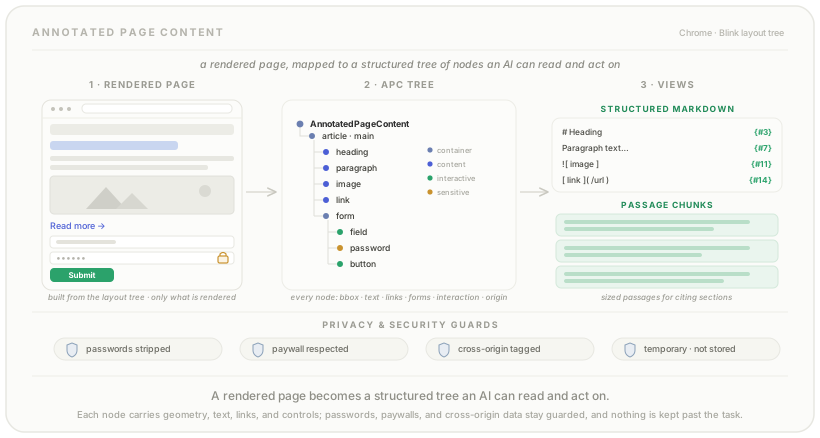
Annotated Page Content (APC) is a structured and actionable representation of a webpage’s content and layout. Its primary function is to enable a deep understanding of page structure, content, and interactive elements by downstream clients, who can receive the information as a protobuf tree.
APC is designed with the following principles in mind:
The foundation of APC is the AnnotatedPageContent protobuf message, which organizes page content into a hierarchical tree.
ContentNodesThe representation is a tree of ContentNodes. These nodes can represent layout containers on the page, grouping related information in a structure derived from the layout tree. This includes:
<article>, <nav>, <section>)ContentAttributes)Each ContentNode contains attributes that describe the element in detail:
TextInfo): The text content, along with styling information like size, emphasis, and color.ImageInfo): The image’s alt text or caption, its URL, and security origin.AnchorData): The destination URL and the link’s rel attribute.FormInfo, FormControlData): Includes the form’s name/ID and data for individual controls like field name, value, and type. Password field values are omitted unless the user has made them visible on the page.InteractionInfo): Describes the node’s interactivity (e.g., clickable, editable, focusable).The following elements are under consideration for future inclusion but are not currently part of the APC structure:
<audio>, <video>)<canvas>) and SVG (<svg>)APC is generated by traversing Blink’s layout tree, not the DOM tree. This is a critical distinction because the layout tree only includes content that is actually rendered on the page.
The generation algorithm recursively traverses the layout tree, creating a ContentNode for each rendered object with structured content or a significant semantic role. It extracts relevant data and organizes the nodes into a hierarchy that preserves the visual order of the page.
On the browser side, the raw APC proto can be converted into various consumable formats, including:
{#ID}) that link back to the original ContentNode.A key goal of APC is to enable reliable interactions with webpages, even when they change dynamically.
To handle dynamic page changes, an algorithm robustly identifies the target element by matching key properties like its type, interactivity, and location. If needed, it can further verify the element by comparing its text content to ensure the correct action is taken.
Using APC requires careful attention to privacy and security. While APC provides data to help mitigate risks, feature owners bear ultimate responsibility.
isAccessibleForFree=false](https://developers.google.com/search/docs/appeara nce/structured-data/paywalled-content)) to flag paid content, and APC includes this signal. Dan Petrovic ·
Sep 22, 19:00
Dan Petrovic ·
Sep 22, 19:00
Pretty simple stuff, but their Screen AI is mad complex:
https://huggingface.co/dejanseo/chrome_models/tree/main/screen_ai
Dan Petrovic ·
Expands · ·
Sep 24, 06:57
hmm… <br> got stripped
Sign in with Google to comment.

tags used for chunk boundaries. I doubt many people would guess that particular approach.
https://chromium.googlesource.com/chromium/src/+/refs/heads/main/third_party/blink/renderer/modules/content_extraction/document_chunker.cc#44